

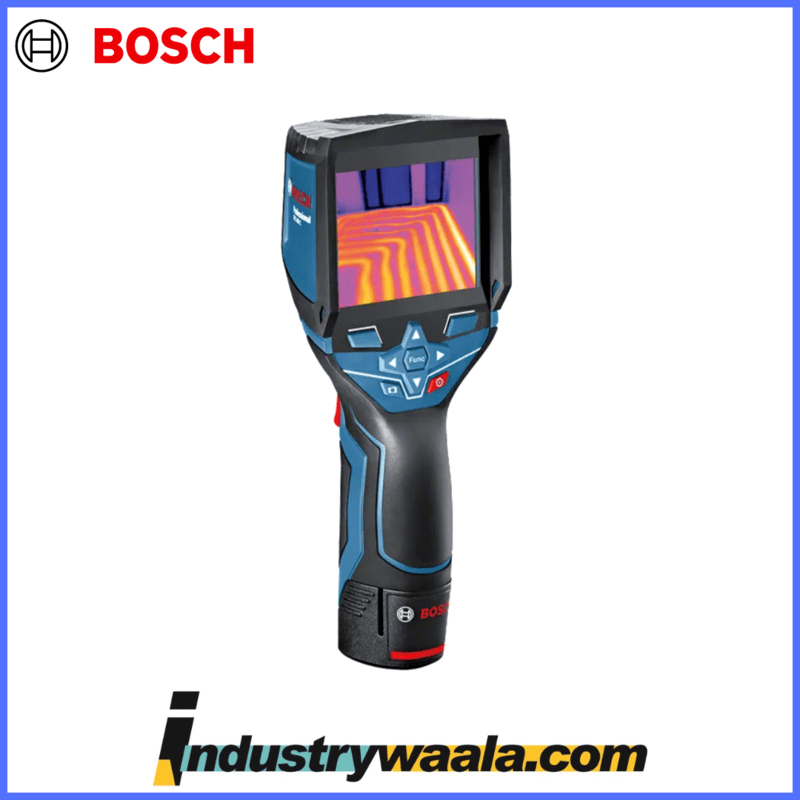
| Brand | Bosch |
| Colour | Blue |
| Age Range (Description) | Adult |
| Included Components | Battery |
| Outer Material | Glass |
Non-returnable
₹70,000.00 ₹100,000.00
Product Details
Ratings & Reviews
Product Details
Product Details
The Bosch GTC 400 C Professional Thermo Camera is a high-quality thermal imaging device designed for professionals who need to measure and analyze thermal data. Here’s a comprehensive overview of its features, specifications, and usage:
Bosch GTC 400 C Professional Thermo Camera Overview
Key Specifications:
- Thermal Resolution: Typically around 160 x 120 pixels
- Temperature Range: -4°F to 752°F (-20°C to 400°C)
- Accuracy: ±2°C or ±2% of the measured value
- Display: 4.3-inch LCD with a resolution of 480 x 272 pixels
- Image Storage: Stores thermal images with data on the device or via an SD card
- Connectivity: Bluetooth and USB for data transfer
- Battery Life: Rechargeable battery with a typical life of up to 8 hours
- Dimensions: Approximately 6.5 x 3.2 x 2.5 inches (165 x 80 x 64 mm)
- Weight: Around 0.4 kg (0.9 lbs)
- Protection Rating: IP54 (Dust and splash water resistant)
Features:
- High Thermal Resolution: Provides clear and detailed thermal images with a resolution of 160 x 120 pixels, allowing for accurate temperature readings and analysis.
- Wide Temperature Range: Measures temperatures from -4°F to 752°F (-20°C to 400°C), making it suitable for a variety of applications from building inspections to electrical and mechanical maintenance.
- Large Display: The 4.3-inch LCD screen displays thermal images with high clarity, making it easier to identify temperature variations and potential issues.
- Image Storage and Analysis: Allows you to capture and store thermal images with corresponding data. Images can be reviewed on the device or transferred to a computer or mobile device for further analysis.
- Connectivity: Bluetooth and USB connectivity options enable easy transfer of thermal images and data to compatible devices for reporting and documentation.
- Ergonomic Design: Designed for comfortable handling with a lightweight and compact form factor, ideal for prolonged use.
- Temperature Measurement Accuracy: Provides accurate temperature readings, essential for diagnosing issues and performing inspections.
- Protection Rating: IP54 rating ensures the camera is resistant to dust and splashes, suitable for use in challenging environments.
Using the Bosch GTC 400 C:
- Setup:
- Ensure the device is fully charged before use.
- Familiarize yourself with the controls and settings.
- Capturing Thermal Images:
- Power on the device and select the desired measurement settings.
- Aim the camera at the object or area of interest and capture thermal images by pressing the appropriate button.
- Reviewing Images:
- Use the LCD display to view captured images. Adjust the display settings if necessary to enhance image clarity.
- Access stored images and data through the device’s interface.
- Transferring Data:
- Connect the device to a computer or mobile device via Bluetooth or USB to transfer thermal images and data.
- Use Bosch’s software or compatible apps to analyze and document the data.
- Maintenance:
- Regularly clean the lens and screen to ensure clear images.
- Store the camera in a protective case when not in use to prevent damage.
- Safety:
- Avoid direct exposure to high-temperature sources.
- Follow standard safety procedures for operating electronic devices.
Troubleshooting:
- Image Quality Issues: Ensure the lens is clean and check the calibration settings. Adjust the image settings on the device if needed.
- Connectivity Problems: Verify that Bluetooth or USB connections are properly established. Restart the device and try reconnecting if necessary.
- Battery Life: If the battery life is shorter than expected, ensure the battery is fully charged and check for any potential issues with the battery or charging system.
For more detailed information on operation, maintenance, and troubleshooting, refer to the user manual provided with the Bosch GTC 400 C Professional or visit the Bosch website for additional support resources.
For more insights contact us:
● Email: info@industrywaala.com
● Contact Number: +91 7377 01 7377
Ratings & Reviews